How to Measure Whether Your Business Shows Up in Google’s AI Answers
Search Console’s Generative AI performance report shows how often your pages appear in AI Overviews and AI Mode. What it shows, what it leaves out, and what to do with the numbers.
To track AI Overviews, open Google Search Console and use the Generative AI performance report. Since 31 August 2026 it has been available to all websites. It shows how often links to your site appeared in Google’s AI Overviews and AI Mode, broken down by page, country, device and date. It counts impressions, which we call appearances in this post. It doesn’t show clicks, and it doesn’t list the searches behind them.
Until this year there was no separate view. Appearances in AI features were counted in Search Console’s main Performance report, mixed in with the rest of web search, and they still are. Google announced the dedicated report on its Search Central blog on 3 June 2026, tested it with a subset of websites first, then opened it to everyone at the end of August. This guide covers what the report shows, what it leaves out, the setting to check first, and what three months of numbers looked like for one of our clients.
What does the Search Console AI report show?
Google’s help page for the Generative AI performance report (Search) says it covers two AI features on Google Search: AI Overviews and AI Mode. Google’s experimental search features aren’t included. The report counts one thing, impressions: how many times links to your site were shown to someone in one of those AI features.
You can group that number four ways, using the tabs above the table:
- Pages: the page that was shown, after any redirects. Like the main Performance report, most data is credited to the page’s canonical address.
- Countries: where the search came from.
- Devices: desktop, tablet or mobile.
- Dates: by day, week or month. All dates are in US Pacific Time, so a day in the report won’t line up exactly with an Australian day.
A filter at the top switches between text searches and multimodal searches, where people search with an image, such as a photo from their phone camera. There’s also an export button that downloads both the chart and the table.
How do you see AI Mode impressions in Search Console?
AI Mode impressions sit in the same Generative AI performance report as AI Overviews. Google lists both features as included, but its help page doesn’t describe a filter that separates them, so treat the total as appearances in Google’s AI answers overall. To read it:
- Open Search Console and choose your website’s property.
- Open the Generative AI performance report. Google’s help page has a direct link to it.
- Pick a date range. Three months is a useful first look, because it shows the trend and not just a single week.
- Read the chart for the trend, then open the Pages tab to see which pages were shown.
- Check the Countries and Devices tabs, then export the chart and table and save the file.
What the report doesn’t tell you
An impression means a link to your site was shown in an AI answer. It doesn’t mean anyone read that part of the answer or clicked through. Keep these limits in mind when you read the numbers:
- No clicks, click-through rate or position. Clicks from AI features are counted in the main Performance report, under the Web search type, with the rest of your search traffic.
- No queries. You can see which pages appeared, but not the searches that triggered them.
- The chart counts by website. If two links from your site appear in the same AI answer, the chart counts one impression. The Pages table counts each page, so the chart total and the table total can differ.
- The newest days can be preliminary. They show as a dotted line and may change over the next few hours.
- The usual Search Console limits apply, including the 1,000-row cap on the table.
So the report answers one question well: is Google using our pages in its AI answers, and which ones? Whether those appearances turn into enquiries is a separate question. Answer it with your own enquiry records and the clicks in the main Performance report.
Not seeing the report? Check your generative AI setting
Google says a missing report usually means the site hasn’t had enough impressions in AI features yet. It can also mean the site has been switched off. Search Console has a Search generative AI control under Settings > Search generative AI, with three choices:
- Include my site’s links and content in Search generative AI features. This is the default.
- Exclude my site’s links and content from Search generative AI features. Your pages won’t be linked or used in AI Overviews or AI Mode, and you won’t get any impressions or traffic from them.
- Inherit control from parent. The property follows the setting of a broader property, such as the whole domain. This is the default if your property has a parent property.
If a developer or a previous agency set up your Search Console, check this page before you read anything into a zero. If the site is excluded and you want to appear, switch it to include. Google says a change usually takes a few days to apply.
What three months of our content work did for one client
EDUTIVE, an Australian real estate CPD training provider, is one of our clients (see the case study). When we started their content program in mid-July 2026, their site had just moved to a new platform and the blog had no search traffic. From then on we published about three articles a week, each answering something agents need to know, such as licence renewal, Class 1 versus Class 2 CPD and the new underquoting rules. Every article opens with a direct answer, links to official NSW Government sources, ends with a short FAQ and points readers to the right course. In late September we made the older articles easier for Google to find and asked it to index them. From October we slowed new posts to one a week and spent the rest of the time updating the existing articles.
Google Search Console’s Generative AI performance report is how we measured the outcome. From 19 July to 18 October, EDUTIVE’s pages appeared in Google’s AI answers 3,380 times:
| Period (2026) | Average appearances a day |
|---|---|
| 19 Jul to 31 Aug | About 9 |
| 1 to 27 Sep | About 13 |
| 28 Sep to 11 Oct | About 90 |
| 12 to 18 Oct | About 200 |
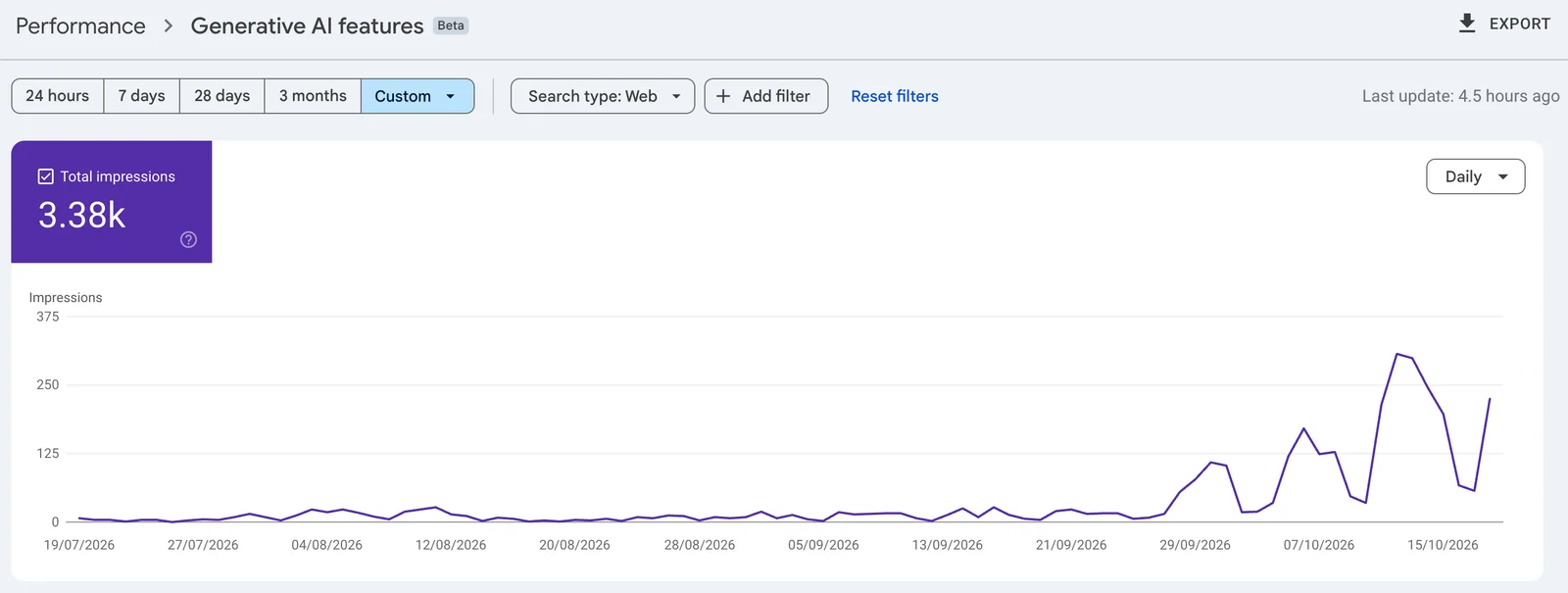
Appearances sat at about 9 to 13 a day until late September. They jumped the week the older articles were indexed, and climbed again after the October updates. The last week alone had 1,397 appearances, 41% of the total. 94% came from searches in Australia. The top four pages were all articles from this program, and together they had 2,326 appearances, or 69%.
Other things played a part too, including EDUTIVE’s October course intake and industry news about the underquoting changes, so we keep checking the report every month. But the pattern is clear. Pages that answer a real question, cite official sources and carry a plain FAQ are the ones Google uses in its AI answers. That is the work behind our SEO and GEO service, and our Care & Grow plan keeps refreshing those pages so they stay current.
What should you do with the numbers?
Make it a monthly check, not a daily one. Each month:
- Export the chart and table for the same date range each time, so you compare like with like.
- List the pages that appeared, and check that each one links to the page you want people to act on.
- Look at the pages you expected to appear but didn’t. Does each one answer its question in the first paragraph, with the important facts in text?
- Put the appearances next to clicks from the main Performance report and the enquiries you received, and write it up in plain words: appearances, not visits or leads.
If pages that should appear don’t, the fix is ordinary search work, not a special trick. Our guide to getting your business into Google’s AI answers covers what Google says it looks for.
If you’d rather we did the publishing, that’s our SEO and GEO work: pages written to answer the questions your customers search, for both classic results and AI answers. Content is $1,200/mo (4 blog posts a month, 3-month minimum, monthly report included). All our prices are on the plans page, and you can book a consultation to talk it through.
Frequently asked questions
How do I track AI Overviews for my website?
Use the Generative AI performance report in Google Search Console. It has been available to all websites since 31 August 2026. It shows how often links to your site appeared in AI Overviews and AI Mode, by page, country, device and date.
Does Search Console show AI Mode impressions?
Yes. The Generative AI performance report includes impressions from both AI Overviews and AI Mode on Google Search. Google’s help page doesn’t describe a way to split one from the other, so read the number as one total for Google’s AI answers.
Can I see clicks or search queries from AI Overviews?
Not in this report. It counts impressions, grouped by page, country, device and date. Clicks from AI features are counted in the main Performance report under the Web search type, together with the rest of your search traffic.
Why can’t I see the Generative AI performance report?
Usually your site hasn’t had enough impressions in Google’s AI features yet. It can also mean the site has been excluded from them. Check Settings > Search generative AI in Search Console and make sure your site is included.
What counts as an impression in an AI Overview?
An impression is each time a link to your site was shown to someone in an AI Overview or in AI Mode. In the report’s chart, two links from your site in the same answer count as one.
How often should I check AI Overview impressions?
We suggest once a month for most businesses. Export the chart and table, compare them with the month before, and note which pages appeared. The newest days can be preliminary, so they may still change.